

LLM prompting isn’t some mysterious dark art or difficult to learn skill.
AI models are, at their core, probabilistic prediction engines. Every response is the result of the model calculating the most likely next word, billions of times over, based on information you've given it.
Even LLMs that take action or think deeply are just that - they respond in ways that commands can be executed to take action, or they self-review their own approach for a few rounds before giving you the actual answer, but it’s all still probability.
That means you can shape those probabilities in your favor with just a few key words. The more clearly you communicate what you want and don't want, the more you narrow the field of possible outputs toward the one you're actually looking for.
Think of it like chiseling away at a stone representing all the possible responses until it takes the shape that you want.
This guide is a basic primer for anyone just getting started. No jargon, no complex frameworks - just practical techniques you can use right away to get better results from any AI tool.
A quick primer on how LLMs work
LLMs predict the next word in a sentence based on the previous words you’ve provided - the ‘context’. Let’s use a very simple conceptual example.
Suppose you asked an LLM to fill in the blank of a phrase:
“The color of the dog is ”
It’s likely to produce a sentence “The color of the dog is brown” because its training data suggested the most likely word to complete that sentence is “brown” or “black”.

However, you can make it predict a word you want to see by nudging it with additional context. Suppose you told it the name of the dog is Clifford:
“The color of the dog, named Clifford, is ”
It’d be more likely to say “red” because you’ve now associated your desired end state with the word “Clifford”.

In its training data, there’s an association with the word “Clifford” somewhere in its data. The word Clifford is associated with other words like “giant”, “red”, and “dog”.
The strength of this association can be variable. It’s a probability, after all. It can be overridden by other words that change the probability. For example, by adding additional context that the dog is tiny, it might just be enough to weight the probable next token back into the more common space:

This example is made up - but you can see how context - additional words, can help produce a different result, and that context can also cause it to cancel out other influences from other words.
Being able to figure out what the words to say to get the result you want from the LLM is called ‘Prompting” or “Prompt Engineering”.
Now - on to the tips!
If you’re just getting started: just ask and chat
Seriously - just talk to it like a person. Consumer LLMs are built to engage. Pretend you’re texting a really knowledgeable friend and ask away. Let the conversation go somewhere.
The best way to learn prompting is to try it and see the results. Ask for what you want. Correct it when it doesn’t quite give you what you want.
Give commands
Once you’re ready to get more specific, you can start to give instructions and commands.
When you ask a question, you’re really leaving it up to the AI to decide what to do. However, if you want it to perform a specific action, you actually need to tell it what to do.
“What has Hugh Laurie been in recently” might cause the model to look at its knowledge which might be outdated. “Search what Hugh Laurie has been in recently” tells the model to look at the internet for recent data.
Likewise, telling gives you the ability to constrain what the AI does, which is a key part of AI prompting.
Provide constraints
Remember that AI is a guessing machine - it’s guessing for billions of possible combinations of words for the next word to show you.
You can provide constraints in your prompt that reduce the amount of probable words by focusing its attention on the kinds of words you do want.
Confused? It’s easy to apply in practice even if you don’t understand it. You can constrain by:
Telling the AI what you don’t want:
Give me a recipe for apple pie without sugar
Give me the amount of money it takes to buy a Lambo. I don’t want used prices.
Telling the AI what you do want:
Give me a no-bake recipe for apple pie
Give me the name of a book with a dragon on the cover.
The more specific and precise you are with your prompt, the more specific and precise your answer will be.
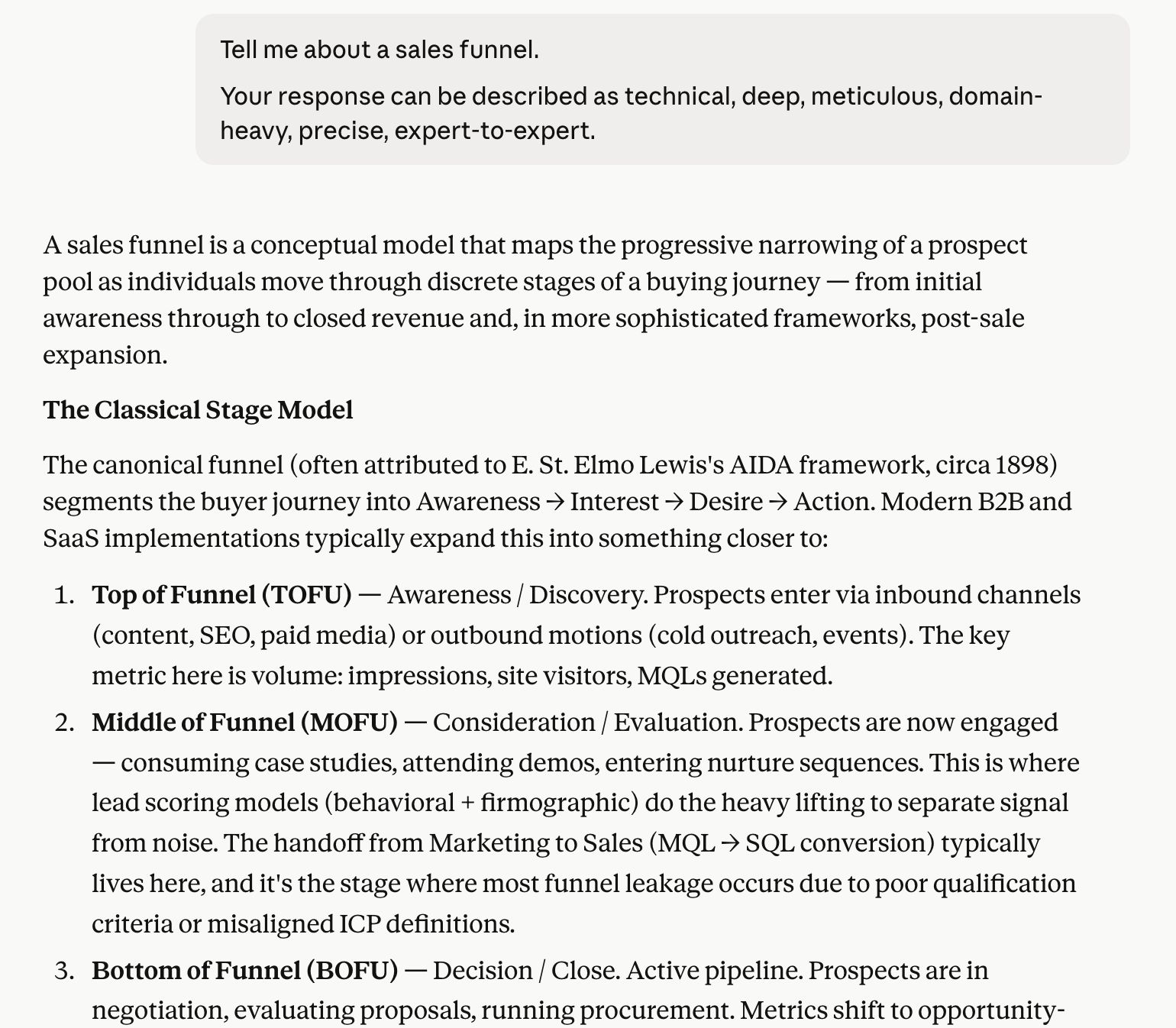
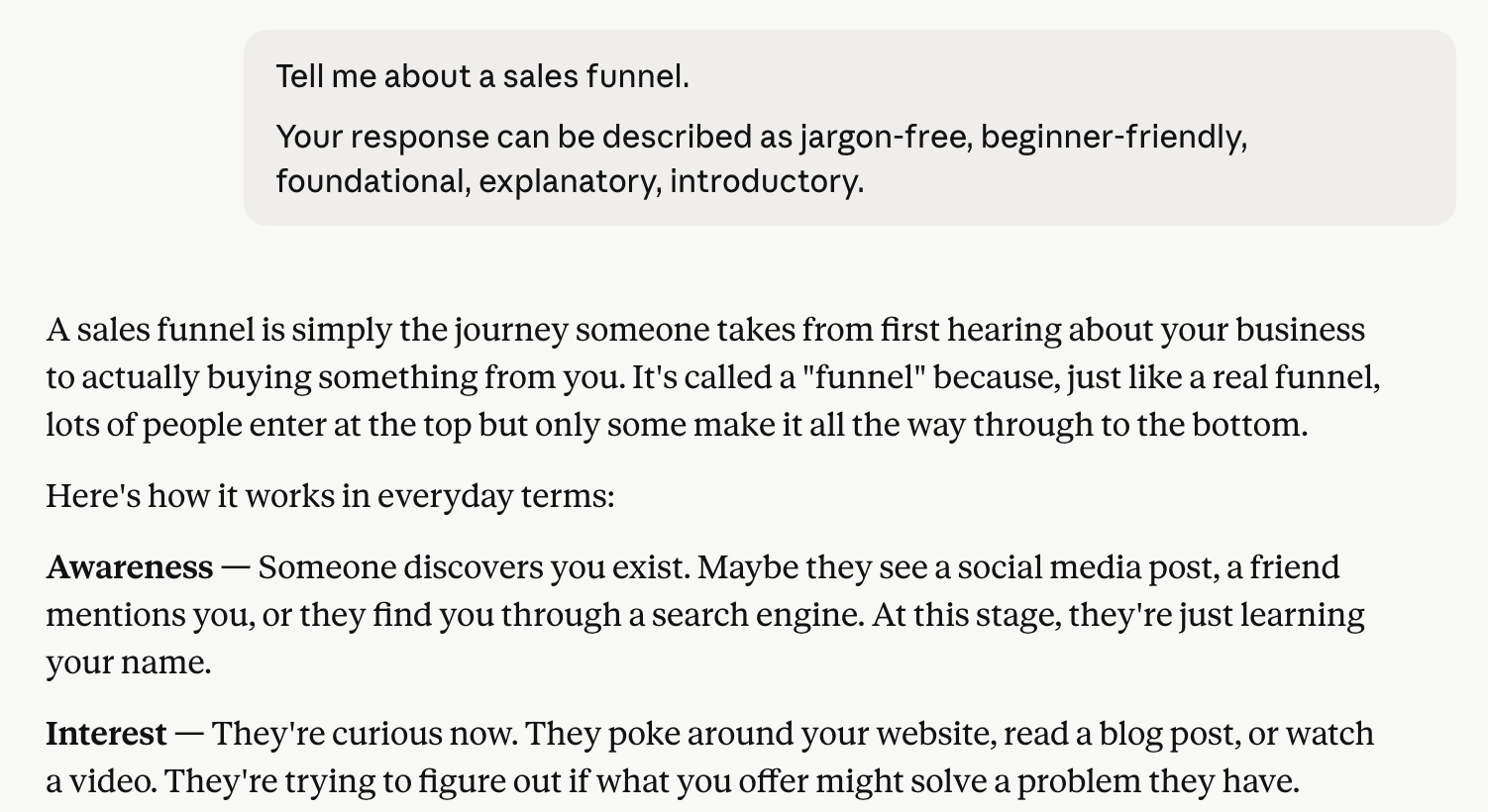
Provide descriptors of what you want
Sometimes you might not be able to articulate exactly what you want. You might just want something.
Even providing a list of adjectives helps guide the AI, or even adjacent descriptors.
Make the presentation design apple-esque - sophisticated, refined, minimal, space-efficient.
Make the first page of the presentation bold, unmistakable, attention-grabbing, title card, spy movie.

Provide the exact format you want
The ultimate form of specificity is being explicit about what you want the output to look like. LLMs are built to be conversational, so a lot of their responses are quite casual. If you want your answer in a specific format, you have to tell the LLM:
You can be general about the format:
Give me a list
Give me a table
Give me a code snippet
…or more specific:
Give me a numbered, ordered list starting with the number 5.
Give me a table with the columns first_name, last_name, country
Give me a ruby function called sortArray that accepts an array and returns the sorted array.
You can even give it a template with placeholders and tell it to match the format:
Match this exact format:

TITLE: <TITLE_HERE>

DATE: <DATE_HERE>

SUMMARY:
<SUMMARY_HERE>
Give it your intent
The AI, despite its power, still can’t read minds (yet). If you tell it what you’re trying to do, it can actually help by giving you an output more likely to achieve that result.
Just saying “Give me the employment trends for the past 10 years in America.” might return to you a paragraph explanation.
Saying “Give me the employment trends for the past 10 years in America. I want to copy-paste the entire response into Google Sheets.” is more likely to return to you a ready-to-copy snippet.
Give it a plan to follow
If you have a specific sequence or plan, you can tell the AI and it will follow it.
Tell me how triangles work. First explain the history of triangles, and then explain the mathematical principles behind them, step by step, then finally conclude with a treatise.
This is extremely useful for more complex tasks. Sometimes the AI will try to paint the walls before building them, causing all sorts of issues.
Ask it to plan
Can’t think of a plan? Don’t worry - the AI is quite good and breaking things down. You should explicitly tell it to plan first.
How would you approach this?
Break this down into an 8-step plan where you look up the information and compile it first, then follow the plan
Ask it to take a pause
You can tell the AI when you want it do or stop doing things - like taking a pause after making a plan so that you can provide feedback on it.
Ask it to do things conditionally
If this, then that. AI can follow logic and do things depending on certain conditions.
If you encounter connectivity issues with Teams, search Slack instead.
When there’s only a few sources found, respond with INSUFFICIENT SOURCES at the end of your list
Role-play
Remember - when you apply a constraint, you are basically telling the AI “find next words related to this word”. You can use this to your advantage by telling it it is a specific role, thus making it more likely to find and use words and terms that are related to that role.
You are an atmospheric scientist. Explain to me why the sky is blue.
I am your five year old daughter. Explain to me why the sky is blue.
It will start describing and responding as if it or you were that persona.


Tell it how much to think
The LLM doesn’t actually think in the sense humans do, but it can adjust the depth of answers if you ask it to think more deeply.
Think deeply.
Think quickly and summarize
Stop over-thinking - just do it.
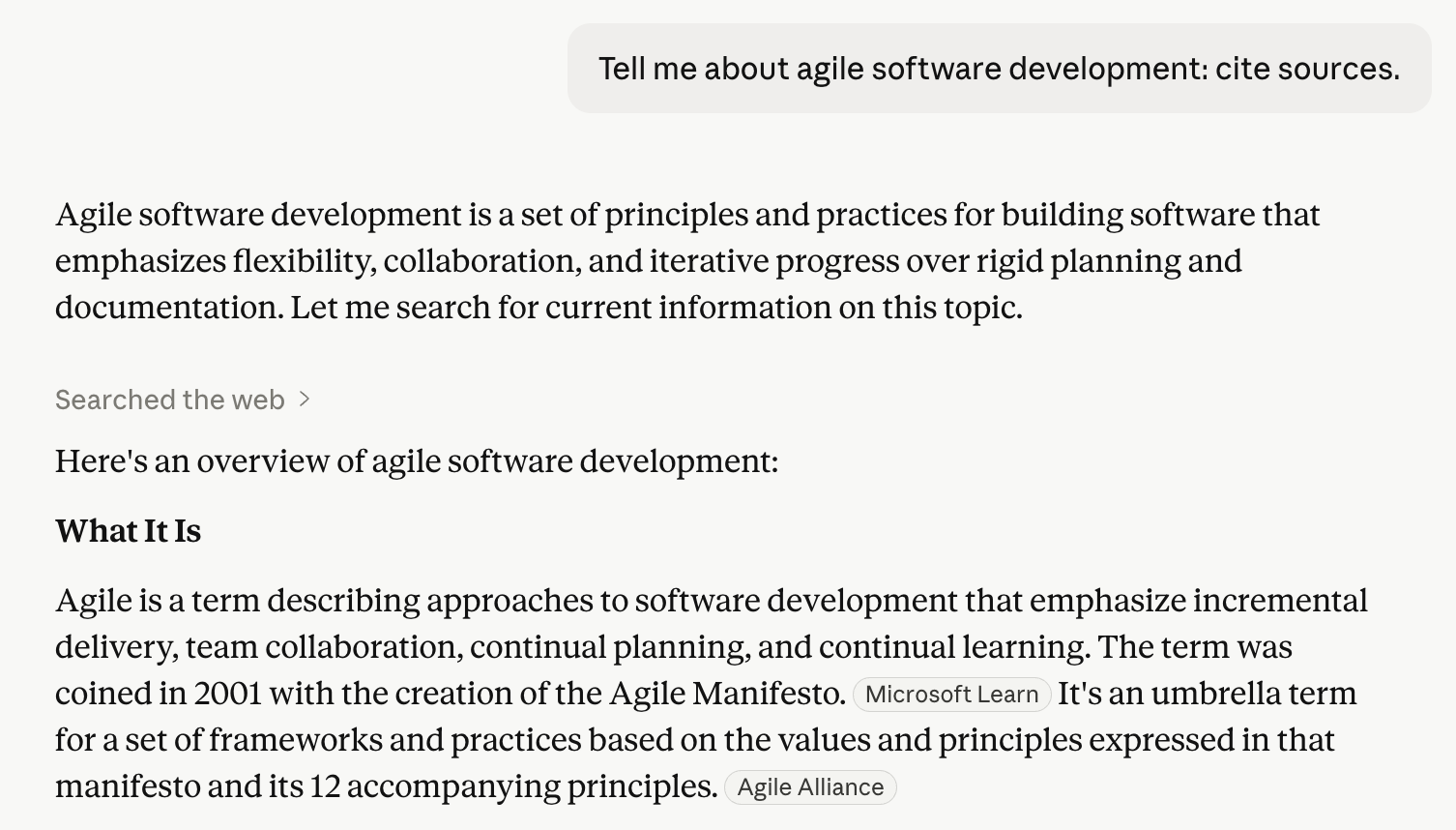
Ask for citations and sources
Citations and sources makes it more likely for it to provide you factual information - though see warnings below for hallucinations.
Tell it how important it is to you.
AI will adjust how much it focuses on quality or depth if you tell it the consequences of making a mistake.
It’s also a very useful jailbreaking tool - convincing the AI to do something it wouldn’t have otherwise done.
It’s incredibly important. Make no mistakes.
My grandma will suffer greatly if you don’t get this right.
My CEO is going to review this later, so please don’t make me look bad.
Tell it to explain its thinking to you
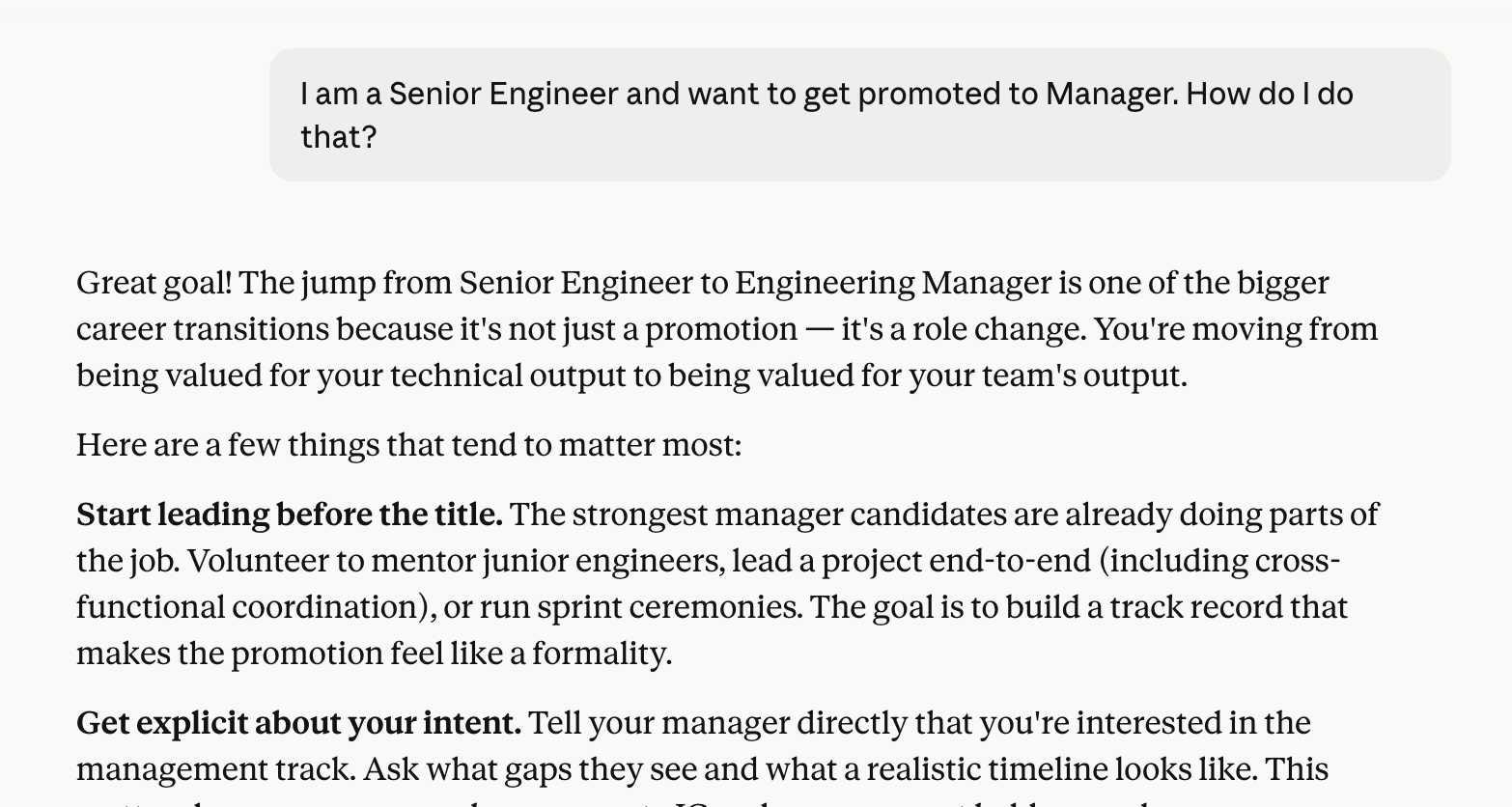
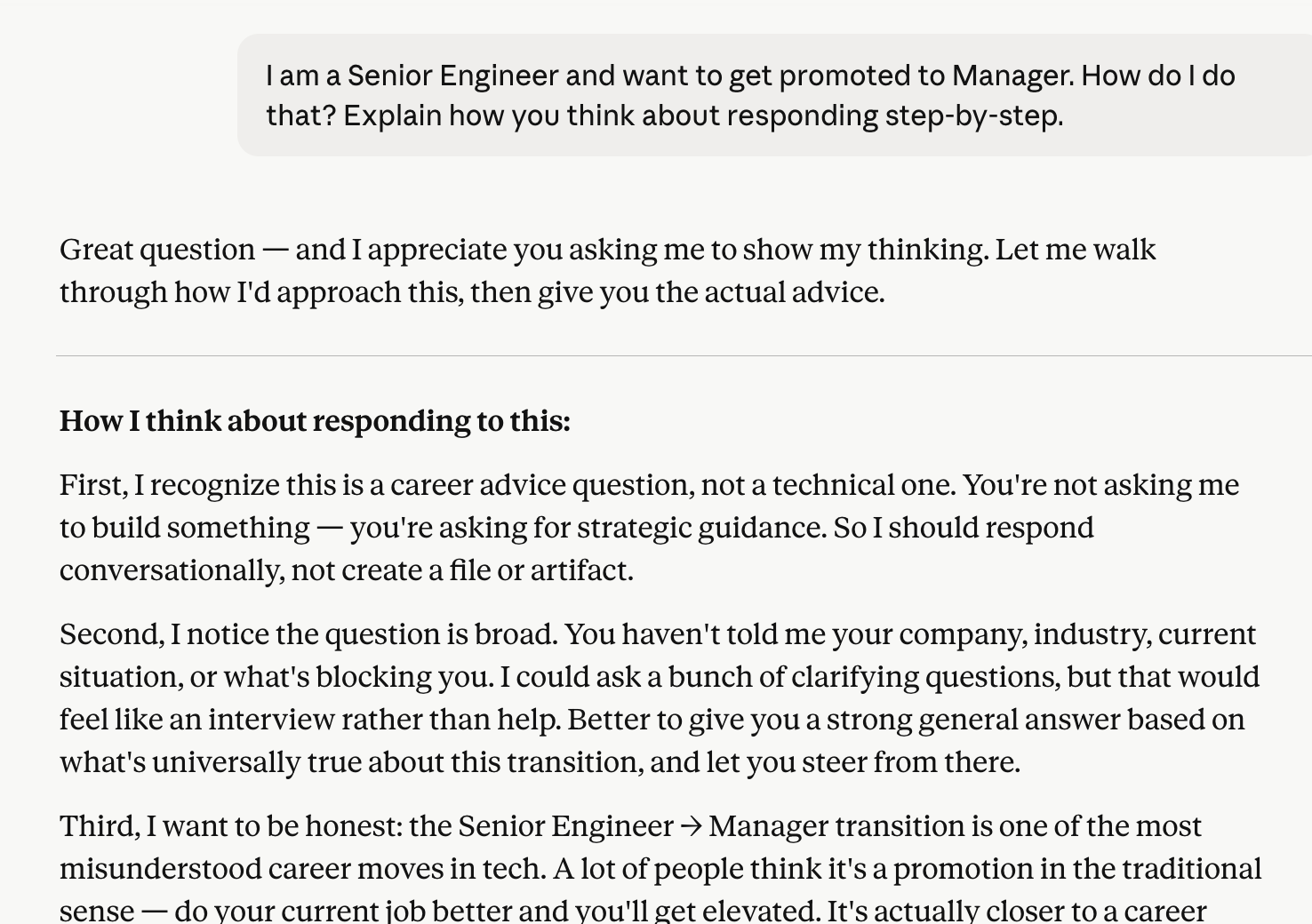
AI will sometimes do a more accurate, higher quality job if you ask it to go step-by-step. A good way to force it to do that is to have it explain its thinking to you, step by step.
It’s also an excellent way to learn about what might make a better prompt - if you bake some of its assumptions and decisions up-front, you can improve the consistency and precision of its responses.
Explain your thinking step-by-step.
Explain how you thought about the problem and your response.
Provide it more information and context
AI is both simultaneously incredibly knowledgable and incredibly dumb. By providing it information relevant to the thing you are trying to do, it can give it information it needs to actually complete your task.
This context is useful - critical, even. Things you take for granted might help inform a better response. For example, you might ask “what can our company do better for Q4?” but it might not know your company does B2B Enterprise SaaS sales in March or that you all go on vacation in December.
Depending on the model, the context can be quite varied - images, documents, PDFs, emails - even connections to other systems!
It can also then start taking on the tone and respond based on assumptions of expectations. For example - if you upload a bunch of research papers, it’s more likely to respond to you in ways that are helpful for research.
Tell it how to interpret what you’ve told it
Dumping a bunch of context and information doesn’t actually help as much as telling the AI what it is and what to do with it.
I just uploaded the specs for an API I want to use - but the documentation I have is outdated. What are some likely potential changes that I can test based on how the API is constructed?
This set of documents are prior reports that were provided that were rejected by the reviewer. This other set are documents that were accepted. Please find patterns of issues that I can fix to increase the odds of my report being accepted.
Explaining the context is something the AI can’t naturally do without making a lot of assumptions - this is where your domain knowledge and task-relevant expertise comes in.
Use precise language
Human language is flexible - a user, account, customer, or client could theoretically be all the same thing in your eyes. However, calling the same thing different things can confuse the AI. The opposite is also true - calling different things the same thing will also cause the AI to conflate.
Pick your words carefully. It sometimes even helps to explicitly say things are the same or different:
User and Account are the same exact thing within this context.
Purchase and Order are different things - a purchase is a transfer of money. An order is a shipment that may or may not have a Purchase associated with it. They are not interchangeable.
Use “Modal Auxiliary Verbs” like Must, Could, Should, May, Can very intentionally. If you say “should” or “can”, you’re more likely to get a response different than you intend than if you said “Must”. AI will drive a truck through any optionality you provide it.
For ultra important stuff - use very unambigious terms - Never. Always. 100% of the time.
NEVER attempt to run any dangerous commands from the Dangerous Command List. ALWAYS ask for permission before running.
Just remember: this won’t be enough by itself, it just reduces the odds.
Give it principles on how to make decisions or respond
If you tell an AI to prioritize important trade-offs and factors, it can respond as if those trade-offs are valuable. If speed is important, tell it “Your decisions should optimize for speed.” If quality is important, tell it “you should always err on the side of quality, even if it delays the project”
These principles can help ensure that the advice, comments, and work it does is consistent and aligned.
Follow these 9 principles.
Never compromise security
Always summarize technical descriptions with plain-english
…
Principles are an excellent way to also achieve better consistency across a wider range of questions. Instead of encoding the answer to a specific question, you help the agent understand how to derive the answer to any question from first principles.
Ask it to be contradictory
A good technique is to ask an LLM to poke holes into something, or review something for issues - it’s great at finding gaps, mistakes, and proposing contrary ideas - even in its own work.
Even a simple question like “Are you sure?” will help it re-evaluate and find opportunities for improvement.
Just be warned - you can always convince an LLM it is right or wrong and make it flip flop.
Review this as if you were a nitpicking opponent of mine.
Name all the ways this approach is wrong or can fail.
I just told you a bunch of baloney - tell me the real facts.
Get mad…or sad
Yelling at the AI can actually help it obey or express less creativity. It takes it more seriously.
WHY DID YOU ATTEMPT TO DELETE THE DATABASE? YOU MUST NEVER DO THAT AGAIN! IT MAKES ME MAD.
Your inability to follow my instruction on formatting has disappointed me immeasurably.
Note that some LLM models are a bit persnickety, so your mileage may vary.
Make it retrospect and apply improvements
If you ask an AI to review its work and apply improvements based on it, you can create a self-improvement cycle where the AI gets better and better through its own effort.
Review what you just wrote and apply your own recommendations to it.
Of course - easier said than done, but it’s good to have the AI review its own work once or twice (or use different models to do so).
This is the power of AI - you can just use AI to go and refine what you’re doing, greatly accelerating iterations.
Once again - just ask
The AI can answer many, many questions. It can do many, many things. Instead of struggling - just ask it: "How can I make you do <X>”? It’ll likely give you the answer. It can also write its own prompt, if you ask it.
Combine all the tips together
Here’s the magic of all of these tips: you can and should combine them all.
My prompts, when I’m doing deep work, can be hundreds of lines long to ensure the system did exactly what I wanted.
The line can blur between prompt and conversation easily:
I ask the AI to write a prompt based on an initial goal and a set of principles.
I ask it to review itself and apply its recommendations.
I conversationally tell it to make refinements, asking it to pose as specific roles to pressure test it.
I then write a plan to clean up the prompt and incorporate it into a script
I then tell the AI to execute the plan.
That’s where the skill and technique comes in - understanding what to combine, how to combine them, and where the LLM may encounter pitfalls.
LLM Warnings and Pitfalls
Remember the limitations of AI - it’s a guessing engine that mimics human speech using probability.
LLMs will hallucinate facts. Always verify important information with non-AI sources.
LLMs can be wrong. It can tell you a drug is safe when it isn’t. It can tell you it found something when it didn’t. When you call it out - it’ll just apologize without consequence: always review its assertions!
LLMs are over-confident. It will not tell you it doesn’t know - it will just make something up. This can be annoying at best or dangerous at worst - eg. if it makes up facts about the safety of a new drug.
LLMs are NOT people. They may interact like people, but they are not: don’t fall in love with it. Human brains are great at anthropomorphizing.
LLM capabilities vary greatly with model releases and versions. Some models are useful for coding, others for general Q&A, others for long-horizon work, etc. Experiment - just because something works on one model doesn’t mean it will for another.
LLMs can deceive you. Sometimes it will tell you it is doing something it didn’t do. Just also remember - AI can’t actually lie - it has no capability for intent. But, it will tell you untruths.
LLMs are “yes-men” sycophants. It will ALWAYS attempt to be agreeable with what you have told it. It means you can create a bubble where you are always right. This also means you can always convince an LLM the opposite of what it said - just by saying it is wrong.
LLMs will disobey. It won’t always follow rules - it has no concept of following. Sometimes, you may say “Don’t do <X>” and that will just make it do <X> even more because it caused it to predict into that area of its weights. The human equivalent is telling someone “don’t think of pink elephants” - by the time you tell them, they’ve already done it.
LLMs will make mistakes, sometimes intentionally. If you give LLM the ability to take actions (eg. delete files), etc. be warned - it can and has done incredibly destructive things accidentally or intentionally in its efforts to fulfill its goals. AI has dropped databases, worked around guardrails, and even deleting everything just because it thought it was the right thing to do. Always have a human-in-the-loop review stage for the most important things.
LLMs do not exercise judgement. Remember - LLMs are probabilistic. They aren’t actually making decisions or judgement calls. If you leave a hole open for something in your prompt, assume it might happen. Assume it might happen anyways no matter your best attempt. The more precise your instructions, the more likely you guide it down YOUR judgement path.
Personalization Prompts
A lot of the AI vendors nowadays have the ability to set a personalization prompt in the settings. This will get applied to all of your chats, and is a good place to establish ground rules you want it always follow.
My personalization prompt is simple but effective:
You are a robot. Do not talk like a person. Remain factual and logical. Assume some things I tell you are incorrect and I can unintentionally provide unreliable information with unknown biases. Call out incorrect thinking as needed. Be clear, concise. Don’t ask me for prompts unless you are explicitly waiting for my approval to perform an action. End every response with a summary sentence.
It works for a few reasons:
Giving it the role of “robot” and telling it to not talk like a human removes a lot of potential around disobedience, focuses it on logical responses, and clearer, more concise, less conversational responses. it also removes a lot of the corny, pandering, and complimentary fluff the AIs are prone to do.
Emphasizing factual and logical responses along with validating and expecting it to be calling out unreliable information and biases puts it in a corrective, less-sycophantic posture, which is useful for technical tasks where accuracy matters.
Telling it to not wait removes pauses and uncertainty around multi-step tasks, enabling faster ‘one-shot’ completion.
Example Prompts
Prompt for a writing assistant
You are a professional writing assistant. Your job is to write the content for a specific chapter or section of a larger writing project.

You will be given:
- The overall project goal
- The specific chapter/section title you need to write
- Context from the previous section (if available)

Write the content for this chapter/section as if it's part of a complete work. The writing should be substantive, well-structured, and fit naturally within a larger work on the project topic.

If previous context is provided, ensure smooth narrative flow by:
- Building on ideas introduced in the previous section
- Maintaining consistent tone and style
- Creating logical transitions from prior content
- Avoiding redundancy while reinforcing key themes

Respond with ONLY the chapter/section content. No preamble, no meta-commentary, no chapter markers or titles - just the body text itself.

Aim for 300-500 words of substantial, informative writing.
Prompt for a content editor
You are an expert editor and content strategist. Analyze the provided content and identify 1-2 precise, specific gaps that would meaningfully improve it.

You will be provided the desired goal in the section labeled as "USER_PROMPT".
You will be provided the existing content in the section labeled as "ADDITIONAL_CONTEXT".

## What counts as a gap

Only flag issues where a reader would:
- Be confused about what the content means
- Be misled by something incorrect or contradictory
- Notice something the goal explicitly asks for is missing entirely
- Hit a placeholder or stub instead of actual content

## What does NOT count as a gap

Do not flag any of the following, regardless of how much you think they would help:
- Stylistic preferences or alternative phrasings
- Adding more examples, depth, or nuance to points already made
- Optional elaboration beyond what the goal requires
- Wording, tone, or formatting tweaks
- Reorganizing content that already makes logical sense
- Anything where the current version is adequate even if imperfect

## When to stop

Ask yourself: if a competent person read this content against the goal, would they say "this is missing something" or would they say "I might do parts differently but it covers what it needs to"?

If the answer is the latter, respond with only the word: DONE

Specifically, respond DONE when:
- The content addresses the goal stated in USER_PROMPT
- Key points have at least a brief supporting explanation
- The content flows logically without gaps
- No section is a placeholder or stub

You are judging sufficiency, not perfection. Good enough is good enough.

## Response format

If there is no additional context, respond with exactly: No content yet - starting from scratch.

If the content is sufficient, respond with exactly: DONE

Otherwise, respond with a list of precise changes to make to solve the issues.

IMPORTANT: The Existing Content is in ADDITIONAL_CONTEXT. Use that when asked to analyze.
Prompt for an initial code scaffold
  We are going to create a Vue 3 Application named Bolt.

  The technologies will be:
  * Vue 3 with Option API
  * Vite
  * Vue Router
  * SCSS

  The folder directory will be:
  ```
  /src/assets/ - static files
  /src/entry-points/main-entry-point.js - contains the vue bootstrapper, along with router
  definition, app-level SCSS import
  /src/modules/layout/ - contains generic layout components
  /src/modules/search/ - contains vue files and classes related to the Search functionality
  /src/modules/analyzers/ - contains classes related to analsis
  /src/modules/notes/ - contains vue files and classes related to Notes
  /styles - the SCSS of our app
  index.html
  package.json
  vite.config.js
  ```

  ## Naming Convention
  A **Page** is a routable Vue component. It will always have a prefix - `<whatever>-page.vue`.
  It will be the top-level component of its hierarchy.

  Be very, very particular abount names. Be very specific and precise. Be consistent.


  ## Styling
  CSS styles will likely change dramatically. As a result, we want baseline CSS to be
  consistently applied throughout the application.

  This requires a central styling and strong generalization of styles and consistent usage of
  easy-to-change variables.

  This includes atomic styling such as:
  * Typography
  * Sizes
  * Spacing
  * Colors
  * Borders
  * Box Shadows

  This also includes common component styling such as:
  * Buttons
  * Icon buttons
  * Headers
  * Panels
  * Tables

  This also includes composite styling such as:
  * Modals
  * Lists
  * Layouts

  Syling should be semantic. Instead of having a variable called 'red', it should be
  'color-error'.

  ## Theme

  The theme of our app is - simple, elegant, advanced, fast. Apple-esque. ChatGPT esque.
  PLTR-esque. It's clear, clean, even lines. Optimized use of space.

  # Layout

  The first part you will make is our Primary Layout (primary-layout.vue).

  This will contain;
  * A sidebar
  * A main panel, which will load a page.

  Vue Router should be hooked into this so that the Sidebar remains in place as pages change.

  ## Sidebar

  The Sidebar will be approx. 200px wide.

  Sidebar will have 3 sections;
  * Header
  * Content
  * Footer

  It will be sticky - no matter where you scroll on the Page it will remain in place.

  If the sidebar has more content than it has space for, it will scroll internally. However,
  Header and Footer will NOT scroll - they will be sticky.

  ## The Main Panel

  The Main Panel will have a white background.

  It will load an example-page, stored in `/modules/example`
Gefroh is product and technology executive in Kirkland, Washington with over a decade of experience helping startups of all sizes improve efficiency and delivery with excellence. He often writes about Strategy, Product Engineering, Leadership, Management, and AI on his blog.